
Restore a Removed User
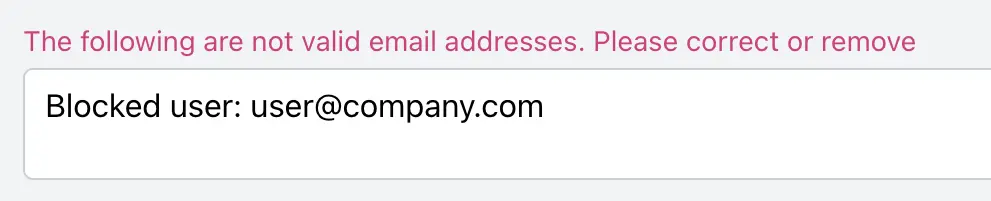
If you try to add or invite someone and see the message "Blocked user: name@company.com", that person already has an account in your community, but their access was removed at some point. You don't need to invite them again. Restore their account and they can log back in.
Prerequisites
- You need the Admin or Moderator role to restore users.
What Is a Blocked User?
A blocked user is someone who used to be a member of your community but was removed. Removing a user:
- Prevents them from logging in.
- Stops all email notifications to them.
- Prevents them from signing up again with the same email address.
That last point is why the Add Users form rejects their email address. The account still exists, so Forumbee won't create a duplicate or send a new invitation.
Removing a user can be undone. When you restore the account, the user gets their access back and their posts stay linked to their profile.
Note: A user who was deleted (not removed) can't be restored, because deleting permanently erases the account. A deleted user can sign up again with the same email address, so they never show up as blocked. See Removing and Deleting Users for the difference.
How to Restore a Blocked User
- Go to Admin > Users.
- Click Search and enter the user's email address.
- You can also open the list menu (it shows Recently added by default) and select Removed, or click Removed in the side column. This lists every removed user. Each one is marked removed next to their join and access dates.
- Click the cog icon next to the user.
- Select Restore User.
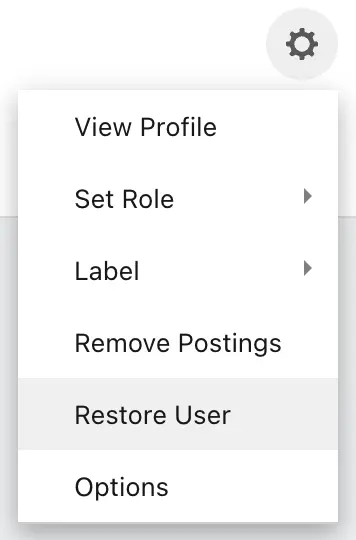
The user's access is restored right away. If their posts were also removed, those posts are restored too.
Important: Don't click Add Users to invite them again. Once their account is restored, they can log in with their existing account.
What Happens After You Restore a User
The restored user can log in with their existing username and password.
If they don't remember their password, they can click Forgot password on the login page to reset it.
If your community uses Single Sign-On (SSO), they can log in through your SSO provider as usual. A removed user is blocked from logging in through SSO until their account is restored.
You may want to let the user know their access has been restored, because Forumbee doesn't send an email when you restore an account.
Frequently Asked Questions
Why does the Add Users form say the email address is not valid? The address is valid, but it belongs to a removed (blocked) account. Restore the account using the steps above instead of re-inviting the user.
What happens to the user's posts? Removing a user doesn't remove their posts. Their posts stay in the community unless an admin or moderator also selected Remove Postings for that user, which is a separate step. If their posts were removed, restoring the user brings those posts back too.
Can a moderator restore a user? Yes. Admins and moderators can both restore removed users.
Can removed SSO users be restored automatically when they log in? Yes, but only by request. By default, a removed user stays blocked even if they log in through your SSO provider. If you'd rather have Forumbee automatically restore removed users when they log in through SSO, contact our support team and we can turn this on for your community. This option isn't available in your admin settings.